Remote Deposit Capture in Columbia Bank
Remote Deposit Capture at Columbia Bank
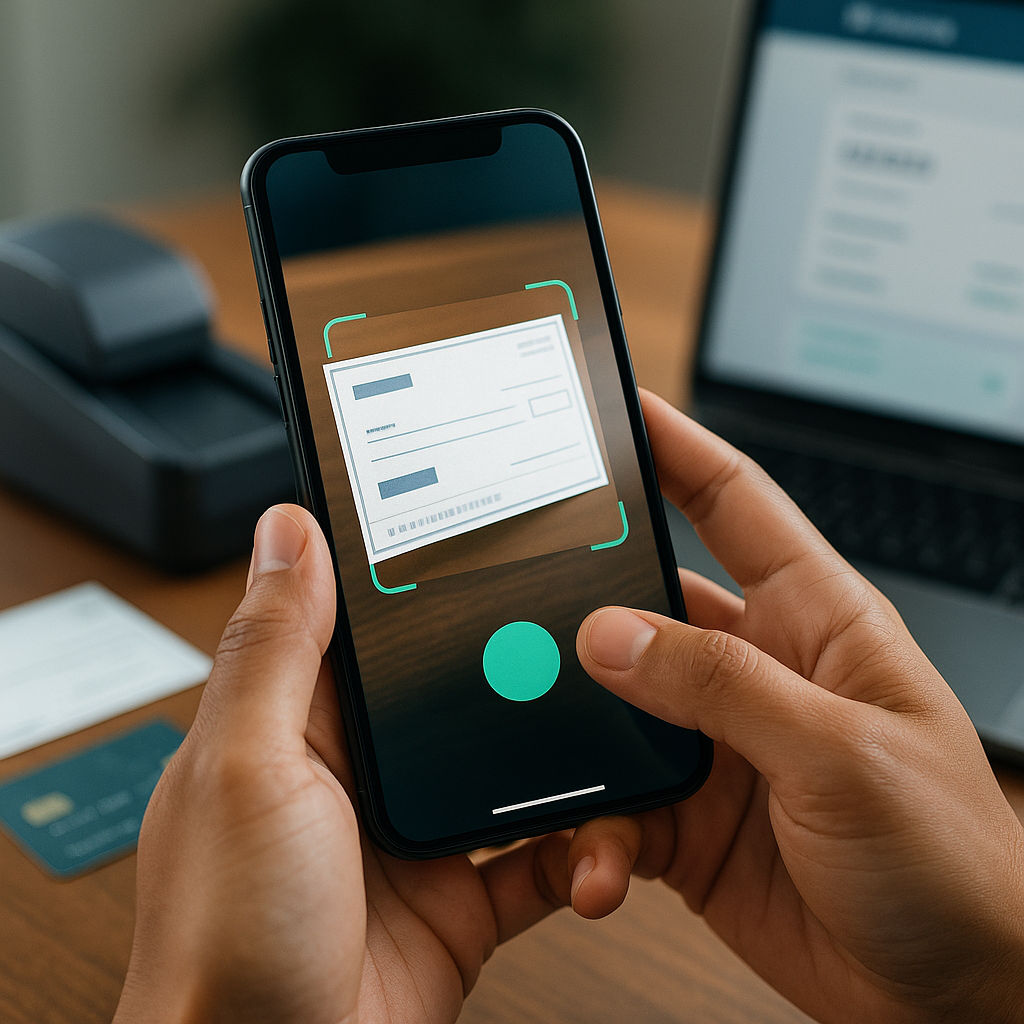
Remote Deposit Capture (RDC) at Columbia Bank is a secure, convenient solution that allows businesses and eligible customers to deposit checks electronically without visiting a branch. Using a compatible scanner or mobile device, users can transmit check images directly to the bank for processing. This service is designed to streamline cash management, reduce time spent on deposits, and accelerate funds availability while maintaining strict security and compliance standards.
Key Benefits
- Time savings: Eliminate trips to the branch or courier service and process deposits from the office or on the go.
- Faster processing: Electronic transmission of check images accelerates deposit posting and often improves funds availability compared with mailed deposits.
- Improved cash flow visibility: Faster deposit times enable better cash forecasting and working capital management.
- Operational efficiency: Reduce manual handling, paper storage needs, and reconciliation time through integrated reporting and batch processing.
- Scalability: Suitable for small businesses through large enterprises with high-volume deposit needs.
Core Features
- Mobile deposit capture: Deposit checks using a secure mobile application with image capture, suitable for low- to moderate-volume users.
- Desktop or network scanners: High-volume businesses can use certified check scanners to capture and submit multiple items in batches.
- Batch processing and deposit creation: Create and submit single or multiple deposit batches with item detail and endorsing images.
- Automated validation: Image quality checks, MICR read verification, duplicate detection, and basic edit checks help reduce reject rates.
- Reporting and exports: Detailed deposit reports, item-level reporting, and file exports support accounting and reconciliation workflows.
- Custom controls: Configure limits, user roles, approval workflows, and deposit scheduling to match internal controls.
How It Works — Step by Step
- Capture: Use a mobile app or certified scanner to image each check. The system guides users to ensure image quality and accurate MICR capture.
- Create deposit: Group imaged checks into a deposit batch, enter deposit details, and verify account and amount information.
- Transmit: Securely transmit the deposit file to the bank using encrypted channels. Transmission typically occurs in real time or on a scheduled basis.
- Processing: Columbia Bank receives the images, performs risk and quality checks, and submits items for presentment and posting.
- Notification and reporting: Users receive confirmation of receipt and can access deposit history and reports to reconcile entries.
Security and Compliance
Security is a core focus of Remote Deposit Capture. The service employs multi-layered protections including data encryption in transit and at rest, secure authentication methods, role-based access controls, and device management for approved capture devices. Additional safeguards such as duplicate detection, limits on item counts and dollar amounts, and image quality thresholds help prevent fraud and reduce operational risk. The service is designed to comply with applicable check processing regulations and endorsement requirements. Proper retention and destruction policies for original paper checks are supported to meet regulatory and internal audit needs.
Eligibility, Limits and Requirements
RDC is available to eligible business and certain consumer account holders. Enrollment typically requires authorization, completion of an agreement that outlines responsibilities and limits, and may include underwriting to determine transaction limits. Technical requirements vary by capture method: supported mobile operating systems and versions for mobile apps, or certified scanner models and drivers for desktop solutions. Minimum software and network requirements, along with recommended image settings and scanner calibration, ensure optimal performance.
Implementation and Onboarding
Onboarding is structured to minimize disruption and accelerate adoption. Typical steps include account setup, user provisioning, assigning roles and permissions, configuration of deposit limits and approval workflows, and installation or certification of capture devices. Training resources, documentation, and test environments help administrators and users become proficient before going live. For larger deployments, phased rollouts and integration with accounting or treasury systems can be coordinated to align with internal processes.
Best Practices
- Endorse and store original checks according to the bank’s retention policy and regulatory guidance.
- Use strong passwords and multi-factor authentication where available.
- Establish internal controls such as dual approval for high-value deposits and periodic reconciliations.
- Maintain a clean, well-lit capture area and regularly calibrate scanners to ensure image quality.
- Monitor deposit and exception reports daily to quickly identify and resolve rejects or discrepancies.
Common Use Cases
Remote Deposit Capture is ideal for a wide range of customers: retail shops and restaurants that receive many small checks; professional service firms and utilities that process regular customer payments; organizations consolidating deposits from multiple branches or locations; and businesses that want to accelerate funds availability and reduce administrative overhead. The flexibility of mobile capture for on-the-go deposits and high-capacity scanners for centralized operations makes RDC adaptable to diverse workflows.
Troubleshooting and Support
Typical issues include image quality rejects, MICR read errors, or network transmission failures. Basic troubleshooting steps often involve re-capturing images with improved lighting, verifying scanner settings and drivers, checking network connectivity, and confirming user permissions and deposit limits. Detailed logs and reporting tools assist in identifying root causes. Support channels and technical documentation aid in resolving complex or persistent issues.
Conclusion
Remote Deposit Capture at Columbia Bank offers a secure, efficient, and scalable way to manage check deposits. By reducing physical trips to a branch, accelerating processing times, and integrating with cash management routines, RDC helps businesses improve liquidity, lower operational costs, and maintain better control over receivables. With robust security, configurable controls, and options for both mobile and high-volume capture, this service supports modern treasury and day-to-day banking needs.
Address Bank: Portland, Oregon, U.S. 45°30′47″N 122°40′31″W / 45.51306°N 122.67528°W / 45.51306; -122.67528
Bank: Columbia Bank
Headquarters: Tacoma, Washington
Products: Payments & Treasury
Type: Remote Deposit Capture





Viewed Items
Banks2go — A Comprehensive Marketplace for Financial and Insurance Services
Banks2go is a user-friendly marketplace that helps you discover, compare, and apply for banking and insurance products in one place. Whether you’re building credit, opening a business account, or shopping for auto insurance, Banks2go brings together transparent information, smart tools, and trusted partners to make selection simple and fast.
Banking Products
Credit Cards- Compare a wide range of cards across APRs, intro 0% APR periods, rewards structures (cash back, travel miles, transferable points), welcome bonuses, balance transfer terms, foreign transaction fees, and penalty rates.
- Filter by your goals—everyday cash back, premium travel, no-annual-fee, balance transfer, or credit building—and see estimated value based on your spending profile.
- Get instant prequalification checks with no impact to your credit score, complete secure online applications in minutes, and track application status in real time.
- See key terms clearly explained: grace periods, minimum payments, credit limits, authorized user rules, and redemption options (statement credit, travel portals, partner transfers).
- Access educational guidance on responsible credit use, utilization ratios, and how on-time payments can strengthen your credit over time.
- Compare business accounts side-by-side on monthly maintenance fees, minimum balance requirements, included free transactions, ACH and wire pricing, cash deposit limits, ATM access, and treasury features.
- Explore value-added services like merchant processing, virtual cards, integrated invoicing, and expense management.
- Onboard quickly online for LLCs, corporations, and sole proprietors with clear documentation checklists and guided KYC/AML steps.
- Connect your account to popular accounting and finance tools (e.g., QuickBooks, Xero) for streamlined reconciliation, payroll, and tax prep.
- View specialized options for startups, freelancers, and nonprofits, including accounts with no or low fees and scalable limits as your business grows.
- Find student-friendly cards with no or low annual fees, simple rewards, spending controls, and features designed to build credit responsibly.
- Get clear eligibility guidance for both domestic and international students, including SSN/ITIN requirements and income verification tips.
- Learn about security deposits for secured cards, credit limit increases with good behavior, and tools that help track spending and avoid late fees.
- Access resources on establishing credit from scratch, protecting your score, and using student benefits like streaming or transit rewards.
Insurance
Auto Insurance- Compare quotes from top-rated national and regional carriers across states, with coverage options that include liability, collision, comprehensive, uninsured/underinsured motorist, roadside assistance, and rental reimbursement.
- Customize deductibles and limits and see how changes affect your monthly premium in real time.
- Explore common discounts—safe driver, multi-policy, good student, usage-based/telematics, multi-vehicle—and understand eligibility criteria.
- Bind e-policies in minutes with digital ID cards and flexible payment options (monthly, quarterly, semi-annual).
- Access plain-English explanations of state minimums, gap insurance for financed vehicles, and when it makes sense to add or drop coverage types.
Easy Selection
Smart Filtering and Personalization- Use dynamic filters and guided questionnaires to surface recommendations based on your financial profile, risk tolerance, and specific goals (e.g., pay down debt, earn travel rewards, reduce fees).
- Compare key terms side-by-side—rates, fees, limits, perks, coverage details, and exclusions—so trade-offs are obvious and transparent.
- Read concise summaries and detailed breakdowns in plain English, with highlight callouts for gotchas like deferred interest, balance transfer fees, or coverage gaps.
Wide Catalog
Broad, Up-to-Date Network- Access a wide network of U.S. banks, credit unions, fintechs, and national insurers—all in one place—so you don’t need to visit branches or spend hours on phone calls.
- See current promotions, limited-time offers, and partner deals aggregated and refreshed regularly, with clear eligibility and expiration details.
- Benefit from standardized comparisons that make complex products easy to understand and evaluate.
Why Banks2go
- Speed and Transparency: From prequalification to application and policy binding, steps are consolidated and clearly explained.
- Education Built In: Bite-sized guides and checklists help you make confident decisions without financial jargon.
- Secure and Privacy-Conscious: Application flows follow industry-standard security protocols, and prequalification tools avoid hard credit pulls unless you opt to apply.
Choose what you need
 More than
50000
services
 Convenient search
 The most beautiful site
 The site works 24/7